What Is a PDF Watermark and Why Remove It?
A watermark in a PDF is a semi-transparent image or text overlaid on the document's pages. It is added for a variety of reasons — to mark a document as a draft, protect intellectual property, brand a document with a company logo, or restrict unauthorized use.
The most common reasons people need to remove a watermark from a PDF include:
- Removing a "DRAFT" watermark after a document is finalized and approved
- Cleaning up a PDF you created yourself before sending to a client
- Removing a trial software watermark from a file you own
- Preparing a presentation or report for professional distribution
It is important to note: you should only remove watermarks from PDFs you own, created, or have explicit permission to edit. Removing watermarks from copyrighted or protected documents you do not have rights to is not permitted.
How to Remove Watermark from PDF — 6 Best Methods in 2026
1. comfortablepdf.com — Best Free PDF Watermark Remover (USA)
The easiest and fastest way to remove a watermark from a PDF in 2026. No software to install, no account required. Just upload your PDF, use the watermark remover tool, and download your clean document in seconds.
Best for: Anyone who wants a quick, free, no-fuss solution that works on any device — desktop, Mac, or iPhone. Cost: Free. Pro plan available for batch processing and larger files. Quality: Removes both text and image watermarks cleanly without affecting the rest of the document.
This is the go-to tool for the 1,000+ people searching "how to remove watermark from PDF" every month in the United States.
2. Adobe Acrobat — How to Remove Watermark in PDF Using Acrobat
Adobe Acrobat Pro has a dedicated watermark removal feature built directly into the editing menu. It works reliably for watermarks that were added using Acrobat's own watermark tool, which covers the majority of professionally stamped PDFs.
How to do it in Acrobat: Go to Tools > Edit PDF > Watermark > Remove. Acrobat will automatically detect and remove any watermarks added through its own system. Click OK and save the file.
Best for: Legal teams, design agencies, and enterprise users who already have an Acrobat subscription. Cost: $24.99/month. Limitation: Only removes watermarks that were added via Acrobat's watermark feature. Watermarks embedded as part of the page content may require manual editing.
3. Foxit PDF — How to Remove a Watermark in PDF Using Foxit
Foxit PDF Editor includes a watermark management feature similar to Acrobat. If the watermark was applied as a standard PDF watermark object, Foxit can detect and remove it cleanly.
How to do it in Foxit: Open your PDF in Foxit PDF Editor. Go to Edit > Watermark > Remove. Select Remove All Watermarks and save the file.
Best for: Mid-market businesses using Foxit as their primary PDF editor. Cost: Free trial available. Pro from $14.99/month.
4. How to Remove Watermark from PDF on Mac Using Preview
Mac's built-in Preview app does not have a dedicated watermark remover, but it can be used to manually edit and remove simple text watermarks using the markup tools. For image-based watermarks, this method is limited.
How to do it in Preview: Open your PDF in Preview. Click the Markup Toolbar button. Use the selection tool to click on the watermark text. If the watermark is a separate editable layer, you may be able to select and delete it. Save the file.
Best for: Simple text watermarks on basic PDFs. For complex or image-based watermarks, use comfortablepdf.com instead. Cost: Free on all Macs.
5. How to Remove Draft Watermark from PDF
The "DRAFT" watermark is one of the most commonly searched removals — 70 monthly searches for "how to remove draft watermark from PDF" confirm this. Draft watermarks are usually added as standard PDF watermark objects, which means they can be removed cleanly using the right tool.
Using comfortablepdf.com: Upload the draft PDF and use the watermark remover. The tool identifies the draft watermark layer and removes it without touching the rest of the document content.
Using Adobe Acrobat: Go to Tools > Edit PDF > Watermark > Remove. Acrobat will strip the draft stamp in one click.
Using Foxit: Go to Edit > Watermark > Remove. Works identically to Acrobat for standard draft watermarks.
If the "DRAFT" text is burned into the page as part of the original design — meaning it was added during document creation rather than as a PDF watermark layer — you will need to use a PDF editing tool to manually cover or remove it.
6. Remove Watermark from PDF Using a PDF Editor — Manual Method
For watermarks that are embedded directly into the page content (not added as a separate watermark layer), you need a PDF editor that lets you manipulate individual page elements.
Step-by-step:
- Open your PDF in a PDF editor such as comfortablepdf.com, Adobe Acrobat Pro, or Foxit PDF Editor.
- Switch to the editing or content editing mode.
- Click on the watermark element — if it is selectable as an object, click Delete or Remove.
- If the watermark is a text element, you can also cover it with a white rectangle using the drawing or shape tools.
- Save and export the cleaned PDF.
This method works for most standard watermarks. Watermarks that are deeply embedded as part of a flattened PDF image are significantly harder to remove and may require advanced editing or recreation of the document.
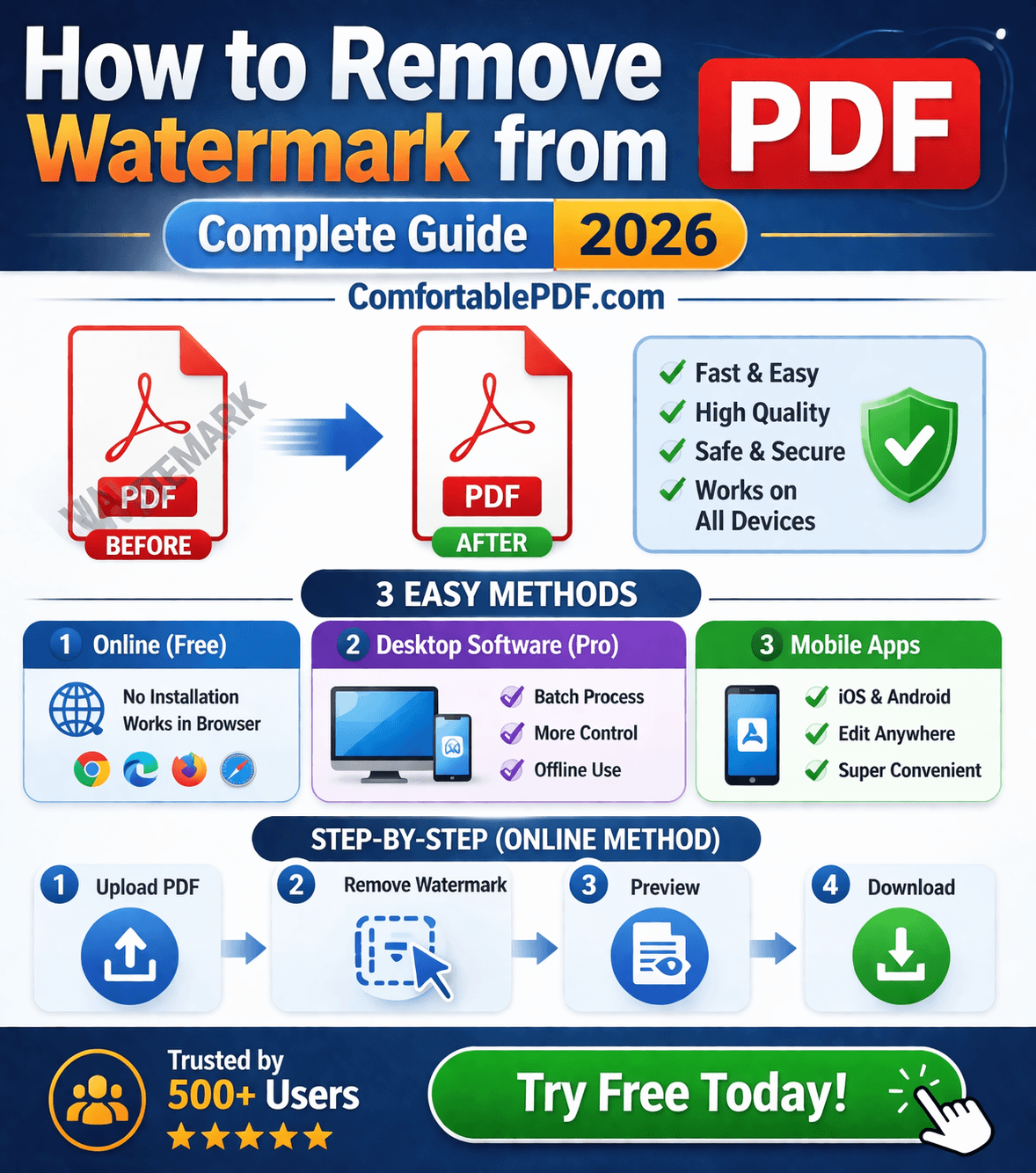
How to Remove Watermark from PDF — Step by Step Using comfortablepdf.com
This is the fastest method for most users in 2026:
- Go to comfortablepdf.com — Navigate to the Remove Watermark tool from the homepage. No account or sign-up required.
- Upload your PDF — Drag and drop your file or click Choose File. Files are processed securely and deleted from servers within one hour.
- Select the watermark to remove — The tool will identify watermark elements in your PDF. Select the watermark you want to remove, whether it is a text stamp, image overlay, or draft mark.
- Click Remove Watermark — Processing takes seconds, even for multi-page documents.
- Download your clean PDF — Your watermark-free PDF is ready to download, share, or email immediately.
Pro Tip: If you are removing watermarks from multiple PDFs regularly, the comfortablepdf.com Pro plan supports batch processing — remove watermarks from dozens of files at once without repeating the process manually.
How to Remove a Watermark in PDF — Common Scenarios
Removing a Watermark You Added Yourself
This is the most straightforward case. If you added the watermark using Adobe Acrobat, Foxit, or comfortablepdf.com, you can remove it using the same tool's watermark removal feature. Since you added it as a standard PDF watermark layer, the removal will be clean and instant.
Removing a Watermark from a PDF You Did Not Create
If someone sent you a PDF with a watermark and you have legitimate reasons to remove it — for example, it is your company's own document and the watermark was added in error — use comfortablepdf.com's watermark remover. Upload the file, identify the watermark layer, and remove it.
Removing Watermarks from PDF on iPhone
With 1,000 monthly searches for "how to remove watermark from PDF" and growing mobile usage, this is a frequent need. The simplest method on iPhone is to open Safari, go to comfortablepdf.com, upload your PDF, use the watermark remover, and download the cleaned file. No app installation needed. Works with files from iCloud Drive, Google Drive, or your local storage.
Removing Watermarks from Multiple PDFs (Batch)
For teams or businesses processing many watermarked PDFs at once, the manual one-by-one approach is too slow. Options include the comfortablepdf.com Pro plan for batch watermark removal, Adobe Acrobat's batch processing feature under Tools > Action Wizard, or a PDF API integration that applies watermark removal automatically across all incoming documents.
Why Is My Watermark Not Removing? — Troubleshooting
Problem: The watermark tool says no watermark detected. This means the watermark is not a standard PDF watermark object — it was likely burned into the page during document creation. In this case, you need to use manual editing: select the watermark element in a PDF editor and delete or cover it with a white shape.
Problem: The watermark reappears after saving. This can happen if the PDF has security or editing restrictions applied. You may need to unlock the PDF first before removing the watermark. comfortablepdf.com also has a PDF unlock tool that removes editing restrictions on documents you own.
Problem: The watermark is part of a scanned image. If your PDF was created by scanning a physical document that already had a watermark printed on it, the watermark is part of the image and cannot be removed by standard PDF tools. You would need image editing software to clean the scanned image before converting it back to PDF.
Problem: The removal leaves a white box or artifact. This happens when the watermark was removed but the background layer beneath it was not clean. In Adobe Acrobat, use the Content Editing tools to clean up any remaining artifacts. In comfortablepdf.com, try reprocessing the file — the tool is designed to remove the watermark cleanly without leaving residue.
Watermark Remover PDF — Free vs Paid Tools Compared
| Tool | Cost | Removes Text Watermarks | Removes Image Watermarks | Batch Processing | Works on Mobile |
|---|---|---|---|---|---|
| comfortablepdf.com | Free / Pro | Yes | Yes | Pro Plan | Yes |
| Adobe Acrobat Pro | $24.99/mo | Yes | Limited | Yes | Limited |
| Foxit PDF Editor | $14.99/mo | Yes | Limited | Yes | No |
| Mac Preview | Free | Limited | No | No | No |
| Ghostscript | Free (CLI) | Yes | Yes | Yes | No |
For most users — including the 260 monthly searching "how do I remove a watermark from a PDF" — a free tool like comfortablepdf.com covers everything needed without spending a dollar.
Frequently Asked Questions — Remove Watermark from PDF
How do I remove a watermark from a PDF for free? Go to comfortablepdf.com, open the Remove Watermark tool, upload your PDF, and download the cleaned file. It is completely free with no account required.
How do I remove a watermark from a PDF document in Adobe Acrobat? Open your PDF in Acrobat Pro. Go to Tools > Edit PDF > Watermark > Remove. Click OK and save. This works for any watermark added through Acrobat's own watermark feature.
How do I remove a draft watermark from a PDF? Upload the PDF to comfortablepdf.com's watermark remover or use Acrobat's Watermark > Remove feature. Draft watermarks added as standard PDF layers are removed in one click.
Can I remove a watermark from a PDF on my iPhone? Yes. Open Safari on your iPhone, go to comfortablepdf.com, upload your PDF, use the watermark remover, and download the result. No app installation needed.
What if the watermark cannot be selected or removed? The watermark is likely embedded as part of the page image. You will need to use PDF content editing tools to manually cover or remove it, or recreate the document without the watermark.
Is it legal to remove a watermark from a PDF? It is legal to remove watermarks from PDFs you own, created, or have explicit permission to edit. Removing watermarks from copyrighted or protected third-party documents without permission is not permitted.
How do I remove watermarks from multiple PDFs at once? Use the comfortablepdf.com Pro plan for batch watermark removal, or integrate a PDF API into your workflow for automated processing at scale.